Becoming an AWS Partner (Partner Central)
Selling on AWS Marketplace runs through AWS Partner Central. This page covers signing up, the stages of becoming a partner, and how payments and fees work.
Where this fits
This is background for Stage 1 of onboarding. To register as a seller and set up tax and banking, follow Become a Seller — AWS. Then link your account in Connect & Go Live.
Registration moved to the AWS Console
Since 30 November 2025, AWS Partner Central is part of the AWS Management Console. Sign-up is based on an AWS account and uses IAM — not the old standalone apn-portal.com flow. AWS also unified Partner Central with the AWS Marketplace Management Portal. → AWS: Partner Central in the console
Sign up to AWS Partner Central
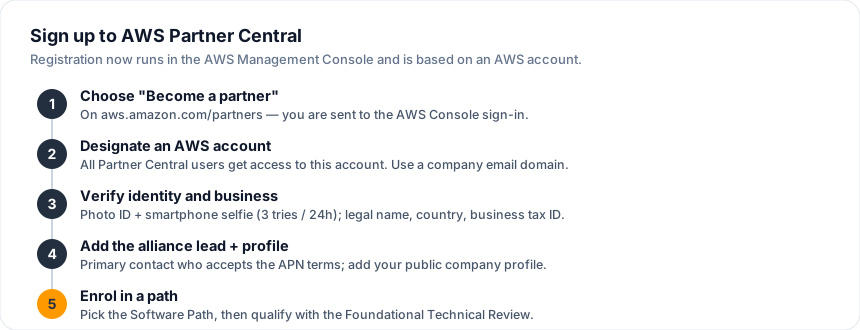
- Go to aws.amazon.com/partners and choose Become a partner. AWS sends you to the Console sign-in.
- Sign in and designate one AWS account for Partner Central. All Partner Central users get access to this account, so pick it deliberately.
- Complete identity and business verification (both are required):
- Identity: a government-issued photo ID plus a smartphone selfie by QR code. You get 3 attempts per 24 hours.
- Business: legal company name, country of incorporation, and business tax ID (EIN, VAT, or GST). One account per legal business name.
- Add the alliance lead — the primary contact who accepts the AWS Partner Network terms — and create your public company profile.
- Enrol in a path (see below).
Company email only
Personal domains (gmail.com, hotmail.com, outlook.com) and .edu addresses are not accepted. Sole proprietors, freelancers without a registered business, and schools cannot complete business verification. → AWS: Verification process
Already a partner?
If you already have an AWS Partner Central account, you are already verified. Skip identity verification and go straight to your path and Marketplace settings. → AWS: Registration process
Choose a partner path
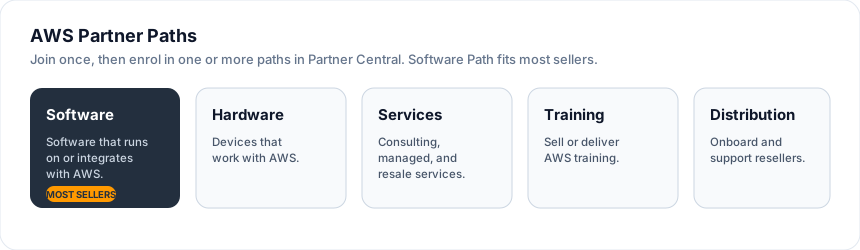
You join the AWS Partner Network for free, then enrol in one or more paths in Partner Central. Most software sellers choose the Software Path.
| Path | For | How you qualify |
|---|---|---|
| Software | Software that runs on or integrates with AWS | AWS Foundational Technical Review (FTR) |
| Hardware | Devices that work with AWS | AWS Device Qualification Program |
| Services | Consulting, managed, and resale services | AWS Services Partner tiers |
| Training | Selling or delivering AWS training | AWS Training Partner |
| Distribution | Onboarding and supporting resellers | AWS Authorized Distributor |
Naming
The old ISV Path is now the Software Path. AWS is updating channel programs through 2026, so confirm current path details in Partner Central.
Stages to becoming a partner
AWS frames the journey as three stages. The Foundational Technical Review is the gate between Registered and Validated, and it unlocks the commercially valuable programs.
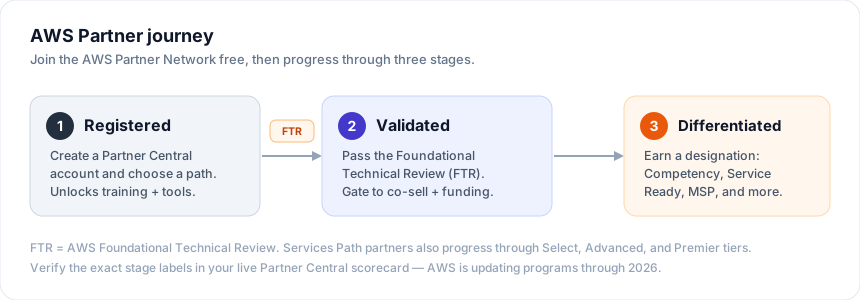
- Registered — you have a Partner Central account and picked a path. This is administrative and unlocks training, enablement, and tools.
- Validated — AWS has reviewed your product through the Foundational Technical Review (FTR). Validation is the gate to co-sell, funding, and analytics. The FTR is valid for 3 years before renewal. → AWS: Updates to the FTR
- Differentiated — you earn a designation such as an AWS Competency, Service Ready, Service Delivery, or the MSP program.
Services Path tiers
Partners on the Services Path also progress through engagement tiers, each with higher requirements for certified staff, launched opportunities, and recurring revenue:
| Tier | Position |
|---|---|
| Select | Entry tier — trained, certified staff and early customer wins |
| Advanced | A strong certified team and proven customer experience |
| Premier | The most experienced partners, recognised as leaders |
Verify the live labels
Public AWS pages describe Registered → Validated → Differentiated. Partner Central may also show enrolment sub-states (for example "Enrolled" or "Confirmed"). Check the actual labels in your Partner Central scorecard before you rely on them.
Payments and fees
There are two sides to money as an AWS partner: fees you pay to AWS, and disbursements you receive from Marketplace sales.
Fees you pay
- Joining the AWS Partner Network is free, including creating a Partner Central account and reaching the Registered stage.
- Program fee — enrolling at a Services tier (Select, Advanced, or Premier) carries an annual fee of US$2,500/year. → AWS: Services Partner tiers
- There is no fee to list a product. AWS charges a listing fee only on transactions (below).
Confirm the Software Path fee
AWS publishes the $2,500/year figure for Services tiers. The Software Path is widely reported to carry the same annual fee, but AWS does not show it on a clean public page — confirm the current figure with your AWS partner team.
Marketplace listing fees (deducted from your payout)
AWS deducts a listing fee from each sale before disbursement. Rates depend on product type and deal size (effective 5 January 2024):
| Sale | Listing fee |
|---|---|
| SaaS — public offer | 3% |
| Server (AMI / container / ML) — public offer | 20% |
| Private offer < $1M | 3% |
| Private offer $1M – < $10M | 2% |
| Private offer ≥ $10M | 1.5% |
| All renewals | 1.5% |
| Channel partner private offer (CPPO) | + 0.5% |
Regional fees can add on top — for example South Korea +1% (from 1 April 2025). → AWS: Understanding listing fees
Getting paid (disbursements)
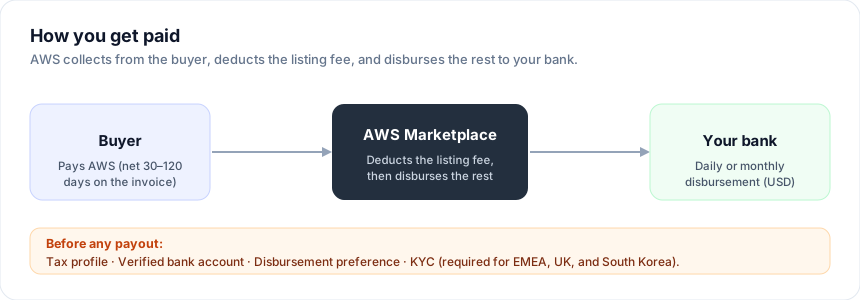
- Choose a daily or monthly disbursement schedule.
- AWS disburses only after it collects from the buyer. Buyers have net 30–120 days to pay their invoice, so your first payout follows the buyer's payment, not the sale date.
- Before any payout you must have a tax profile, a verified bank account, and a disbursement preference set. For EMEA, the UK, and South Korea you must also complete KYC ("Know Your Customer"). → AWS: Disbursement preferences · AWS: KYC process
Set up banking early
You must have bank and disbursement details set before you can create any public or private offers. Do this early so listing work is not blocked. The full steps are in Become a Seller — AWS.
What becoming a partner unlocks
- Co-sell via ACE — share pipeline and co-sell with AWS through the APN Customer Engagements program, inside Partner Central.
- ISV Accelerate — AWS account managers earn incentives for co-selling your solution through Marketplace private offers.
- Marketplace private offers — custom pricing and terms, linkable to co-sell opportunities.
- Funding — MDF, proof-of-concept and GenAI funding, and private-offer promotions (most funding needs the Validated stage). → AWS: Co-sell with AWS
Next step
Ready to register as a seller and set up tax and banking? Continue to Become a Seller — AWS.
Need Help?
Contact hello@automatum.io or use the in-app chat for help with AWS onboarding.